
Coupa or SAP Ariba Supplier Discovery vs a Specialist Tool: When to Use Each
Coupa and SAP Ariba run sourcing well. For engineered equipment, here is where a specialist supplier search tool helps, how it works alongside the suite, and a decision table.
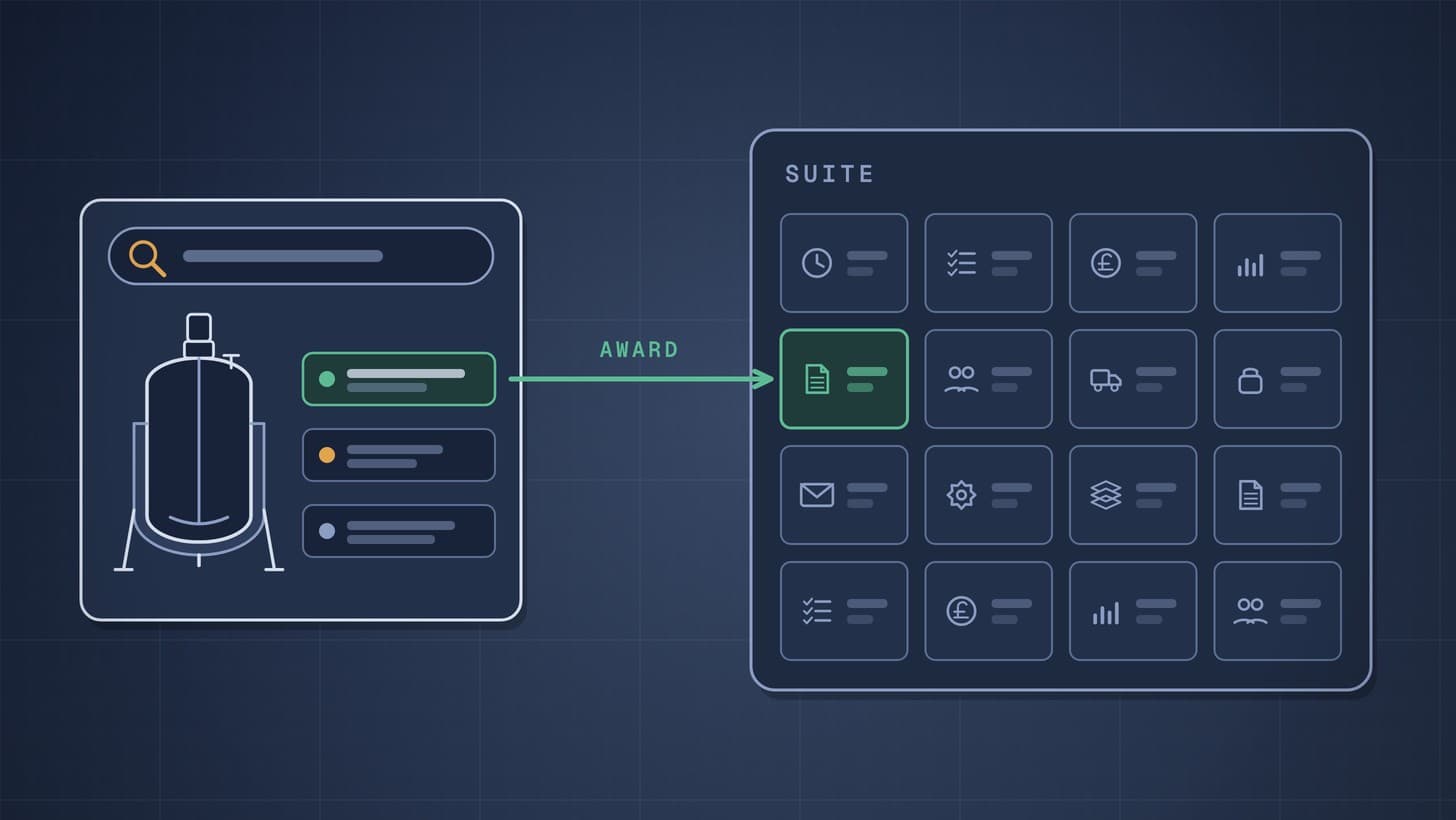
Coupa and SAP Ariba are strong at running sourcing at scale: very large supplier networks, sourcing events built from templates, bid comparison and award optimisation [1] [2] [3]. For engineered process equipment, much of the hard work comes earlier in the job: finding small specialist fabricators who may not be registered on the network, and judging technical fit against a datasheet before anyone is asked to bid. A specialist supplier search tool helps there. It sits before the purchase order and works alongside the suite, not instead of it.
ChemCapital makes a tool of this kind, so read this as an informed view, not a neutral one. Facts about Coupa and SAP come from their own pages, as at November 2026. For the wider field of sourcing tools, see our comparison of RFQ and sourcing software for engineered equipment.
Why this matters now
Supplier discovery has become a priority for the suites themselves. On 6 October 2025, Coupa announced an agreement to acquire Scoutbee, an AI powered supplier discovery platform and network, to combine Scoutbee's AI search, network and dataset with its own platform [4]. Coupa put the combined network at more than 10 million buyers and suppliers [4]. A suite provider agreeing to buy a discovery business suggests where buyers want help: finding the right suppliers, not only running the event.
For capital equipment the stakes are higher. In a 2012 article, BCG noted that external spending can be 80 percent or more of a capital project's total budget [5]. It recommended bringing procurement in at the concept phase and warned against engineers committing to suppliers too early [5].
At concept stage there is usually no sourcing event yet, so the search for candidate suppliers happens wherever the engineer looks. If that search sits outside procurement's tools, the suite only ever sees the suppliers someone has already chosen.
Create and manage RFQs in minutes
ChemCapital handles the entire procurement cycle, from structured RFQs and supplier comparisons to formal purchase orders and delivery tracking.
What Coupa and SAP Ariba offer for supplier discovery
Both suites do a great deal, and both are adding AI to how suppliers are found. Here is what each says it offers, as at November 2026.
SAP Ariba and SAP Business Network Discovery
SAP Business Network Discovery is SAP's matchmaking service. A buyer posts a description of its need, and SAP matches it to suppliers whose profiles list those products or services and the locations they serve; matched suppliers see the posting on a leads dashboard and decide whether to respond [6]. SAP says a posting is free and takes about five minutes, and suppliers get a free Discovery account [6].
SAP describes a global network of millions of suppliers from more than 190 countries, across more than 20,000 UNSPSC categories (a standard code system for classifying products and services) [1]. Matching relies on what suppliers put in their profiles: capabilities, certifications and standards. Buyers compare bids, review proposals and award contracts from the same interface [1].
SAP Ariba Sourcing builds on this. Its features include simplified sourcing intake; guided sourcing with Joule, SAP's AI copilot, to help create events, select suppliers and read files; discovery linked to SAP Business Network Discovery; and bid analysis with bid comparison, single and split awards and award scenario optimisation [2]. In plain terms, scenario optimisation lets a buyer compare different ways of awarding, such as one supplier or a split between several, before choosing.
Coupa Sourcing and Scoutbee
Coupa Sourcing runs sourcing events from templates and collects supplier bids, with scenario modelling and optimisation for complex awards [3]. Buyers can browse thousands of suppliers that are already rated and enabled on the platform, and filter them by diversity status, ratings and geography [3]. Coupa says bidders are screened against third party risk policies, and that awards convert into contracts and catalogues, connected to its procurement, contract and supplier management tools [3].
Coupa's stated aim for the Scoutbee deal is to bring AI search, a supplier network and a dataset into its platform to drive supplier intelligence and discovery [4]. Ask your Coupa account team what your own licence includes today.
Where the suites are strongest
The suites bring scale, one process from intake to award, and award analysis for buys with many lines or suppliers [2] [3]. For repeat buys, catalogue spares and well covered categories, that is usually all you need.
Why engineered equipment is different
An engineered package, such as a jacketed reactor or a clean in place (CIP) skid, is not bought the way a catalogue item is. Five things change, and each is worth checking against how your suite is set up.
- Specification heavy RFQs. The purchase is defined by a datasheet, drawings, materials, a design code and a document list. A category code says what kind of product a supplier offers, not whether it can build to your design pressure, material and code. IOGP, the oil and gas producers' association, launched its JIP33 programme in 2016 to standardise the specifications operators use to buy equipment, after industry cost and schedule overruns of more than 40 percent [7]. Each of the 60 specifications it had published by March 2026 pairs a supplementary specification with data sheet requirements for information, quality and procurement [7]. The principle holds for a reactor on a pharma or chemicals site: the datasheet defines what you are buying.
- Small specialist makers. The best fabricator for a niche duty may be a small workshop that has never set up a profile on your suite's network. SAP's network matching works from supplier profiles [6], so check whether the makers your engineers already know appear, and how they describe themselves.
- Technical evaluation before price. A bid that misses a mandatory requirement, such as material or scope, is out whatever it costs. Check whether your events score technical criteria line by line or leave that to a spreadsheet; our guide to technical bid evaluation covers the method.
- Project based demand. Many packages are one offs. The next reactor may be years away, so there is no contract, catalogue or recent bid list to fall back on. Procurement cover can be thin too: BCG cites one global resources company where 40 percent of projects had no dedicated procurement manager [5].
- Long lead items and documents. Big packages are ordered early, so a thin supplier list found late costs schedule. Inspection and test plans, hold points and vendor documents must be in the RFQ for bids to price them.
None of this is a flaw in Coupa or SAP Ariba. They are built to run sourcing and purchasing across many categories of spend, at a scale a specialist tool does not try to match. The point is fit: engineered packages need more work before the event than most categories do.
Suite alone or suite plus a specialist tool
Decide package by package, not once for the whole company.
| Situation | Suite alone usually enough | Add a specialist tool when |
|---|---|---|
| Repeat spares and consumables | Yes. Catalogues and contracts already cover them | A part is single source or obsolete and you need an alternate |
| Standard equipment with a good approved list | Usually. Run a sourcing event with approved suppliers | Too few approved suppliers can bid, or one has no capacity |
| Engineered package with datasheets and drawings | The suite runs the award, contract and order | You need new fabricators, judged on published technical data before the RFQ |
| New duty, material or technology for the site | A network posting by category is a useful start | Few matched suppliers publish data for your duty point |
| New region for a project | Network filters by geography help | Local specialist makers are not on your network |
| Quotes in many formats to compare | Keep it in the suite if your events already score technical criteria | Quotes arrive as PDFs that need reading, scoring and mandatory checks |
How a specialist tool fits alongside the suite
A specialist tool covers the engineering heavy part of the job: turning a datasheet into a credible list of suppliers, and turning three differently formatted quotes into a decision you can defend. The award then goes into the suite, which raises the purchase order (PO) and holds the contract as it does for everything else. In process terms, it is feed preparation upstream of the main unit, not a second main unit.
 The specialist tool prepares the supplier list and the comparison; the suite still raises the order.
Here is how ChemCapital, one such tool, covers each step:
- Finding suppliers on the open web. Supplier Discovery takes a text description, a pasted RFQ or an uploaded specification and searches the public web. Each result shows the product parameters the supplier publishes, with source links, and a fit verdict against your duty point: Strong, Partial, Information Missing or Rejected. Gaps are flagged, results are matched against your approved vendors, and matches can go straight into a live RFQ. Certifications are shown as the supplier claims them; ChemCapital does not check them, and nothing is sent to a supplier automatically.
- Structured RFQs. Every supplier gets the same specification, quantities, delivery dates and deadline at the same time. Suppliers who are not on ChemCapital can be invited.
- AI quotation comparison. Each comparison takes up to three quotes. It extracts price, lead time, materials, certifications and scope, scores commercial, technical, delivery, compliance and risk with weights you set, and flags mandatory fails regardless of price. A person reviews the extracted values before anything is saved, and the comparison exports to Excel.
- Handing over to the suite. The award goes into Coupa or SAP Ariba for the PO, with the Excel comparison as the record of why. Single sign on (SSO) and Coupa or SAP Ariba integration are available on ChemCapital's Enterprise plan only; they are not part of the standard plans.
Whichever specialist tool you look at, ask: does it link to where each supplier was found, judge fit against your duty point rather than a category, leave people to decide what is sent and saved, and say how the award reaches your suite, on which plan?
Practical example
This example is illustrative. A site making chemicals and pharmaceutical intermediates runs SAP Ariba (the routes would be the same on Coupa) and has three packages this quarter.
| Package | Illustrative value | Route | Why |
|---|---|---|---|
| Jacketed reactor, 4 m³, 316L, full vacuum to 6 bar g | £421,000 award | Specialist search, RFQ and comparison; award and PO in the suite | Only one approved fabricator has capacity |
| CIP skid for the same building | £260,000 estimate | Sourcing event in the suite | Repeat design; four approved builders already set up in the suite |
| Spare mechanical seals, 12 types | £36,000 a year | Suite catalogue for 11 types; specialist search for 1 | One type is single source |
The reactor. Of the two approved reactor fabricators, one has said its shop is full for the next year. Wanting at least three credible bids, the buyer and the project engineer run a Supplier Discovery search from the draft datasheet at concept stage. It returns 14 candidates: 5 Strong, 4 Partial, 3 Information Missing and 2 Rejected, with the other approved fabricator, A, among the Strong results. The engineer reads the source links for the other four Strong results and quality runs the site's usual prequalification; three pass. The structured RFQ goes to A, B, C and D, and D declines to quote.
Three quotes come back:
- A, the approved fabricator: £448,000, 42 weeks.
- B, new: £389,000, 38 weeks, but it excludes the agitator seal system, which the RFQ made mandatory.
- C, new: £421,000, 36 weeks.
On price alone, B wins by £32,000. The comparison flags B's missing scope as a mandatory fail, whatever the price, and the engineer confirms it against B's quote before saving. C is £27,000 below A, six weeks quicker and best on the team's weights, so the team recommends C. C completes the site's normal supplier onboarding in the suite, and the buyer raises the PO there with the Excel comparison attached.
The CIP skid. The site has bought similar skids before, reuses its user requirement specification (the document setting out what the equipment must do) and has four approved builders set up in the suite. The buyer runs a sourcing event from a template with all four. No second tool is needed.
The seals. Eleven of the twelve types are bought from a catalogue in the suite and stay there. The twelfth fits an older agitator and comes only from the original maker. A Supplier Discovery search on the seal's size, pressure, temperature and materials returns 6 candidates: 2 Strong, 3 Partial and 1 Information Missing. The two Strong makers and the original maker get the same RFQ. If an alternate passes the site's checks, it joins the suite's catalogue like any other item.
Across the three packages, the specialist tool handles one whole package and one seal type before the PO. Everything else stays in the suite.
Try it on your next engineered package
If your suite already runs sourcing well, keep it. Try Supplier Discovery on the next package where the approved list looks thin; three searches are free without signing up. Use the free sample comparisons, or upload your own quotes, on the AI quotation comparison page. If you need SSO or Coupa or SAP Ariba integration, see Enterprise.
Ready to find more credible suppliers for your next engineered package? Start a free 14 day ChemCapital trial, with no credit card needed.
Frequently asked questions
Does Coupa have supplier discovery?
Yes. Coupa's Sourcing page (read November 2026) says buyers can browse thousands of suppliers already rated and enabled on the platform, filtered by diversity status, ratings and geography, and on 6 October 2025 Coupa announced an agreement to acquire Scoutbee, an AI powered supplier discovery platform. Check with Coupa what your own licence includes.
What is SAP Business Network Discovery?
It is SAP's matchmaking service: a buyer posts a need, SAP matches it to suppliers whose profiles list those products or services and locations, and matched suppliers choose whether to respond. SAP says a posting is free and takes about five minutes.
Do we need a specialist supplier search tool if we already use Coupa or SAP Ariba?
Not for every purchase: repeat buys, catalogue spares and well covered categories usually sit well in the suite. A specialist tool earns its place on engineered packages where you need suppliers beyond your network, judged on published technical data, before the RFQ goes out.
Does ChemCapital integrate with Coupa or SAP Ariba?
Single sign on (SSO) and Coupa or SAP Ariba integration are available on the ChemCapital Enterprise plan only, not on the standard plans. Without integration, ChemCapital still covers supplier search, RFQs and quote comparison, and the award goes into your suite for the purchase order.
Continue reading
Informational only, not procurement or legal advice. Cited names, frameworks, and statistics belong to their respective owners.
Create and manage RFQs in minutes
ChemCapital handles the entire procurement cycle, from structured RFQs and supplier comparisons to formal purchase orders and delivery tracking.
Start for freeRelated articles
Spend Analysis for Engineered Equipment (Free Template)
How to run a spend analysis for pumps, valves, instruments and packages: data sources, cleaning, supplier grouping, classification, what to look for, and a column template you can copy.
CSV vs CSA: Computer Software Assurance for Equipment Buyers
FDA finalised its computer software assurance guidance in 2025 and updated it in 2026. Here is what changes from classic CSV, where it applies, and what to ask equipment suppliers.
EU GMP Annex 11 and Its Revision: What Equipment Buyers Should Ask For
What Annex 11 already requires when you buy equipment with software, what the 2025 draft revision adds on suppliers, access, audit trails and security, and the questions to put in every RFQ.